Financial Management in Jira: Budgeting and Strategic Financial Planning Tools
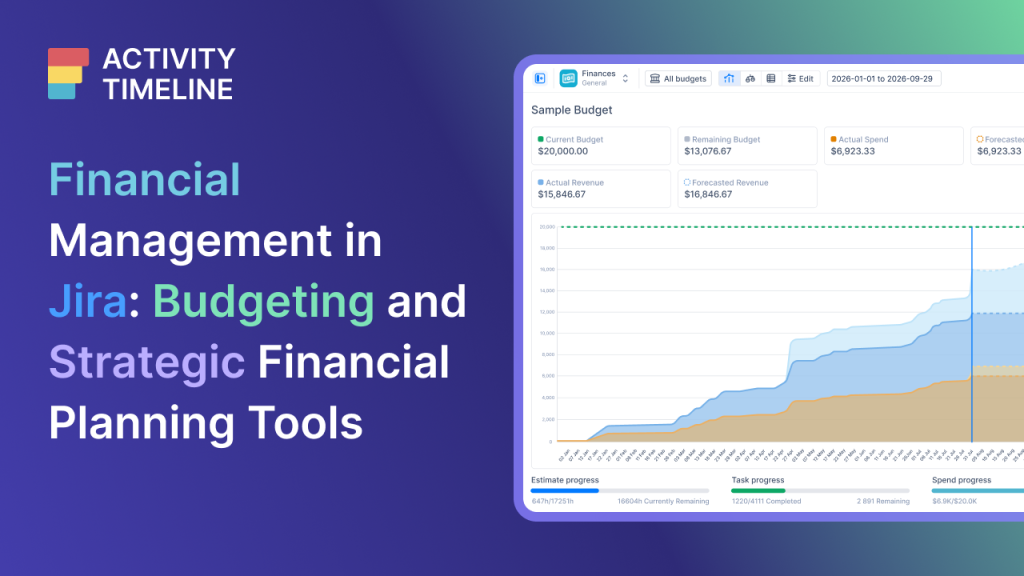
Financial management in companies has changed. Today it demands speed, flexibility, and real-time data, because projects change all the time. Managers need to know exactly where every dollar goes while the work is happening – not weeks later, when the spreadsheet finally gets updated.
That’s where financial management in Jira comes in: connecting project tasks to actual costs the moment they occur, providing continuous financial visibility across all projects.
Without clear budget tracking inside Jira, it’s easy to waste money on the wrong tasks or only discover a project went over budget when it’s already too late. And efficiency is a top priority for companies today: 88% of CFOs point to finance team productivity as one of their main goals. They want to make decisions based on clear data – not assumptions.
In this guide, you’ll understand what Jira offers (and doesn’t offer) natively for financial control, which tools in the Atlassian ecosystem help in each scenario, and how ActivityTimeline Finances, available on the Atlassian Marketplace, turns Jira into a hub for managing costs, revenue, and budgets.
Financial control in Jira Cloud: native features and limitations
Jira is excellent for tracking day-to-day tasks and project timelines. Teams use built-in features like original estimates and worklogs to monitor hours. For finance departments, Jira also offers basic process control templates: you can set up workflows to track invoice statuses or manage purchase approvals.
With Jira Plans, you can also visualize how project changes impact your team’s resources and schedule.
The problem starts when the focus shifts to tracking costs. Jira Cloud has no native concept of currency. It records hours precisely, but cannot automatically convert those hours into costs or revenue. There are no native settings for hourly labor rates, billable rates, or profit margins.
In practice, this means:
- You cannot track budgets directly in the tool;
- Standard dashboards show project progress, but don’t deliver true financial management;
- There’s no automatic alert when a project goes over budget.
Because of these limitations, financial managers usually export data into Excel spreadsheets. And this manual approach creates serious risks: copying data easily breaks formulas and messes up formatting. Managing budgets in separate spreadsheets also delays reporting. A 2025 study by Datarails showed that 90% of companies still rely on Excel for finance – and constantly face version control issues and typing errors. When managers decide based on outdated data, they decide worse.
Other Atlassian tools for financial management
Jira Align
While daily operations happen in projects, strategic decisions call for Jira Align. This enterprise-level tool was built for portfolio financials and corporate budget management, connecting team delivery data to high-level financial views.
Jira Align consolidates engineering progress from multiple projects and translates it into financial figures. This gives leaders the visibility they need to track the actual value of funded initiatives. With multi-tiered roadmaps, managers see dependencies, map team capacity to high-priority work, simulate scenarios, adjust investment plans when the market changes, and keep all product investments aligned with major business goals.
Jira Service Management for the finance department
Jira Service Management (JSM) handles day-to-day financial operations. It includes a specific Finance Service Management template that helps set up a central service portal: employees use this portal to submit financial requests, ask questions, or consult a knowledge base.
The template keeps budget and procurement requests organized in a single secure space, replacing endless email chains with clear workflows and trackable SLAs. Strict permissions protect sensitive financial data and help with regulatory compliance, while AI and automation sort tickets into priority queues, saving time on repetitive tasks.
These tools solve important parts of the problem – but none of them tracks, in real time, how much each project costs and how much it earns. That’s the gap ActivityTimeline Finances fills.
What is ActivityTimeline Finances
ActivityTimeline Finances is part of the ActivityTimeline ecosystem and can be installed directly from the Atlassian Marketplace. Once added to Jira, it extends your project management environment with built-in financial tracking capabilities.
It’s an advanced cost tracker that integrates project financial management with Jira: you see your projects’ costs and revenue without leaving the tool where the work already happens. The module works as a financial layer over daily tasks, turning scheduling and updates into clear financial data.
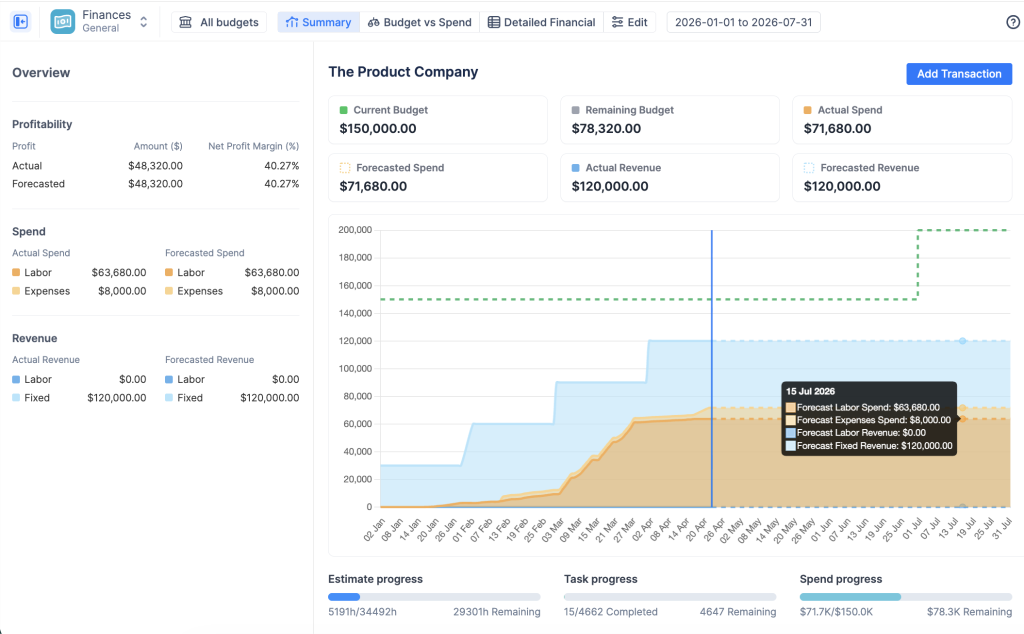
The scope of each tracker is defined by Jira projects, specific Epics, or JQL filters. From there, the module monitors three areas to build the complete profit-and-loss picture:
- Budgets (planned targets): how much you can spend. You can enter a fixed amount manually or let the system calculate it automatically from the original estimates on your Jira tasks. The budget can also be broken down into smaller pieces per person or type of work.
- Costs (actual spend): the money actually spent as the project progresses. The system calculates this by multiplying the hours your team logs in Jira by their cost rates, and adds extra expenses that don’t depend on hours — like software licenses or travel.
- Revenue (actual income): the total the project generates. It’s calculated by multiplying logged billable hours by your client billing rates, with the option to add fixed income, such as project milestone payments or subscriptions.
All of these updates in real time across a summary dashboard and financial reports. The main dashboard gives managers an immediate view of the project’s financial health, displaying profit margin, budget caps, and actual expenses on a single screen.
The big advantage over Excel is live synchronization: native Jira worklogs are converted into money automatically and in real time. To determine the correct hourly or monthly rate for each date, the system follows a rate hierarchy: it first looks for a category rate (applied to specific types of work); if missing, it checks the individual user rate; and if both are missing, it falls back to the budget’s default rate.
The module also supports fixed monthly rates for salaried employees, converting the monthly amount into a daily cost. Because everything updates the instant someone logs time, you never work with stale data or broken spreadsheet formulas.
Budgeting and strategic financial planning
Budget setup
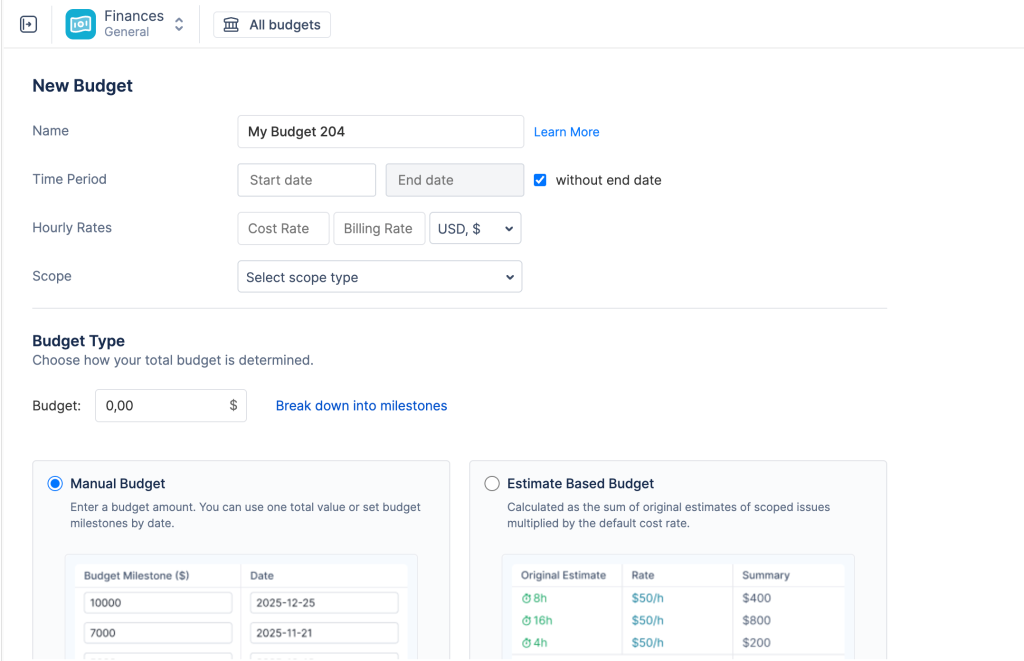
Setting up a budget in ActivityTimeline starts with choosing how to calculate the total spending limit. There are two methods:
- Manual budget (top-down): ideal when management sets a fixed cap. You enter the amount and, if needed, split it into milestones with specific dates.
- Estimate-based budget (bottom-up): instead of typing a number, the system calculates the budget for you, multiplying the original time estimates on your Jira tasks by your team’s cost rates.
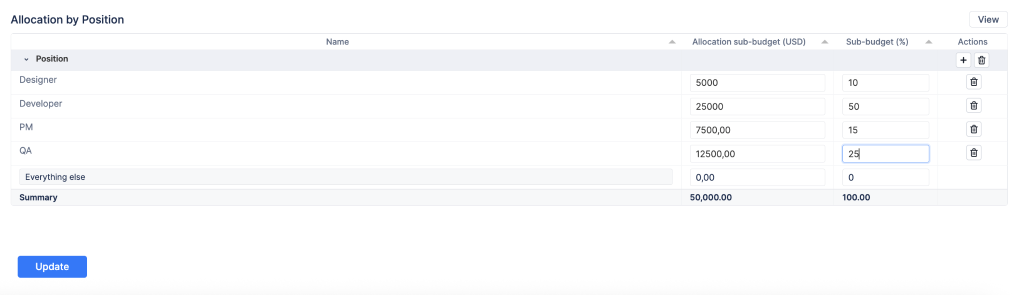
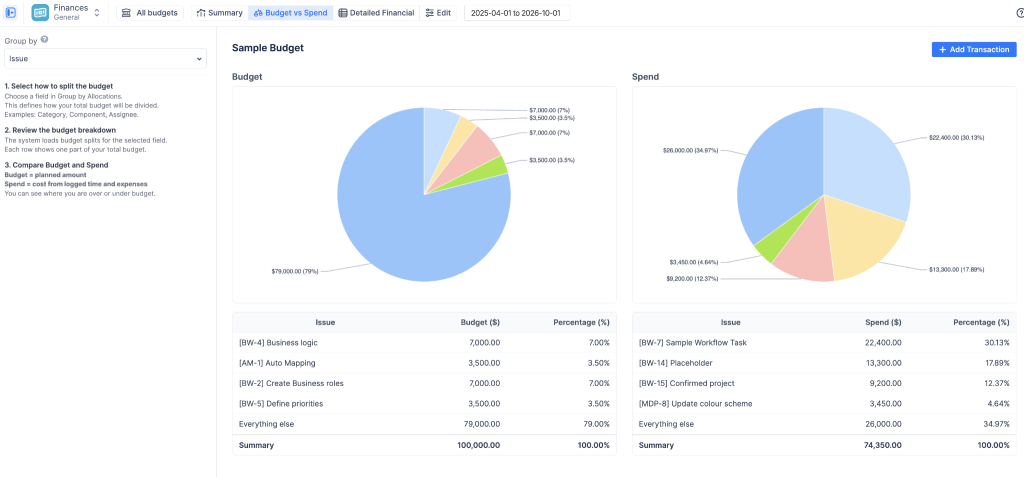
Once the budget is consolidated, you can distribute it into smaller pieces by Jira project, component, category, or assignee. You define, for example, how much goes to billable versus non-billable tasks, or to urgent work – using exact amounts or percentages. These rules feed directly into your charts and reports, letting you compare planned targets against actual spending in real time.
Cost and revenue monitoring
To reveal the project’s true financial health, the module combines two data streams:
Automated labor costing. The system automatically calculates costs and revenue by multiplying logged Jira hours by each person’s rates. For salaried employees, the monthly salary is converted into a daily rate. Everything happens in the background, with no manual data entry.
Manual fixed transactions. Real projects always include costs and income that don’t depend on hours. You manually record fixed expenses (software licenses, travel) and fixed revenue (milestone payments, flat fees). Entries can be one-time or recurring, which helps you build accurate financial forecasts.
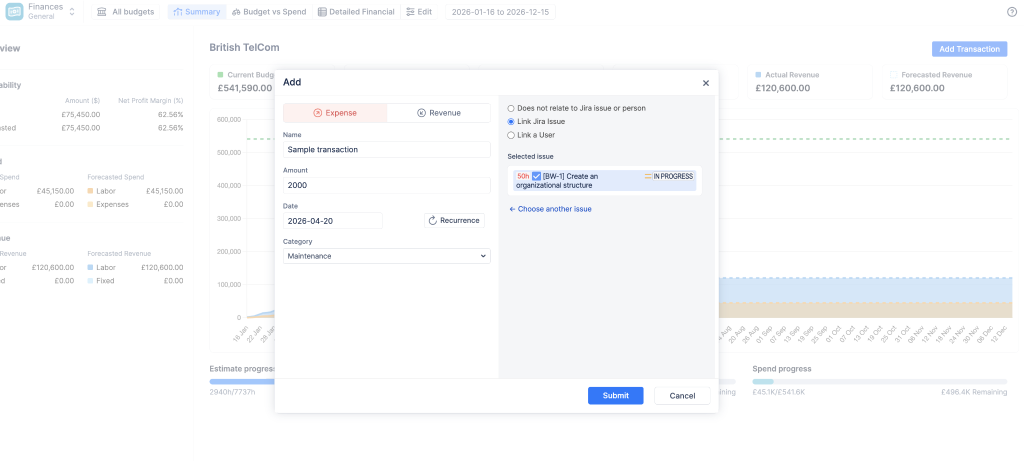
You can also link manual transactions to specific team members. When you connect a transaction to a user, the system shifts its category from non-labor to labor – perfect for person-specific items like bonuses, remote work stipends, or sales commissions. This way, final reports show the exact investment in each person.
The rate math
ActivityTimeline uses two methods to determine financial impact:
- Hourly rates: multiply logged hours by each user’s specific rate.
- Monthly rates: apply a fixed cost for salaried workers, automatically converted into a daily rate.
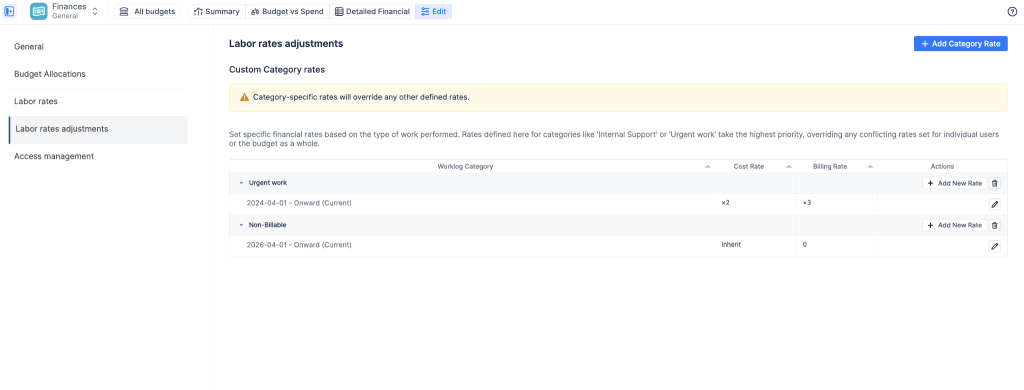
All rates use effective dating: changes only affect future work and never corrupt past records. To find the right rate for each worklog, the tool follows the priority order mentioned above – category, user, and default budget rate.
Category rates let you adjust the financial math for specific types of work: a flat amount or a multiplier (for example, charging double for urgent support). You can also set the billing rate to zero for internal tasks while still tracking the team’s actual labor cost.
Forecasting and detailed financial reports
The module automatically generates reports to answer different questions:
- Consolidated summary dashboard: a project overview with six key metrics, including remaining budget, actual spend, and revenue. A cumulative trend chart shows the historical burn rate, calculates the net profit margin, and builds reliable forecasts to alert you early when a project is heading over budget.
- Budget vs. Actual Spend analysis: compares real-time costs against planned targets, grouped by category, project, or assignee. Pie and bar charts quickly reveal whether a specific area is exceeding its financial cap.
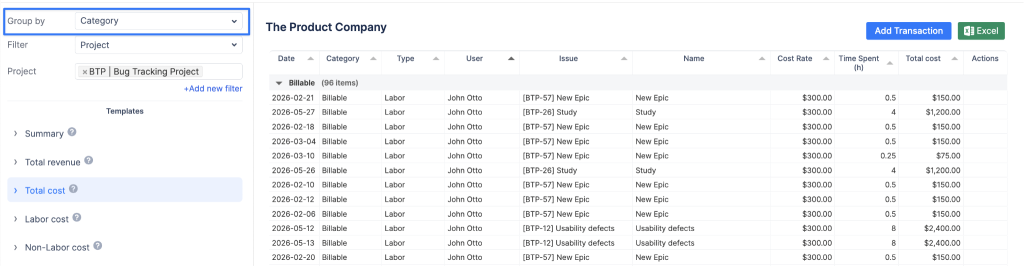
- Detailed Financial tab: every transaction in a line-by-line list, merging hourly worklogs, monthly salaries, and manual expenses into a single view. Quick templates filter the information, and data can be exported directly to Excel – useful for client invoicing or external audits.
Governance and security for financial data
Financial data is sensitive, and the module was designed with that in mind:
- Full administrator control: with a single button, the system can be activated or deactivated for the entire organization. When off, direct links are blocked and the module completely disappears.
- Two access modes: the default mode opens the menu for administrators, managers, and team leads; the restricted mode limits access to a specific list of people (accountants, CFO), blocking everyone else.
- Three permission levels per budget: the Owner (creator) has total control and manages who can see the budget; Administrators edit settings and rates, but cannot add or remove users; Read-only users view dashboards and export data, with sensitive rates and salaries completely hidden.
- Mirroring of Jira permissions: even with access to a budget, no one can see its financial data without the native “Browse Project” permission in Jira. Your confidential data stays protected.
Best practices for financial management in Jira
Standardize financial workflows. Define clear, identical rules for all teams: how to log hours, which task categories to use. With everyone following the same rules, financial data stays clean, projects become comparable, and human error decreases.
Monitor costs in real time. Don’t wait until the end of the month to check project expenses. Connect daily Jira worklogs directly to your financial tools and see the actual cost of labor as the work happens — so you quickly notice when a project is burning through its budget too fast.
Use financial dashboards frequently. Make dashboard checks part of the weekly routine, tracking remaining budget, actual spend, and current revenue. Spending trend charts, shared with managers, make it possible to spot financial risks quickly.
Establish a financial oversight process. Define clear roles: who creates budgets, who manages permissions, who reviews final reports. Run periodic checks comparing actual project progress against money spent. If task completion is low and spending is high, it’s time to step in. A strong review process keeps projects profitable and secure.
Conclusion
Standard Jira tracks project timelines very well, but it can’t manage money on its own. To stop relying on risky spreadsheets and instantly see the real financial health of projects, companies need a financial layer inside Jira itself. ActivityTimeline Finances builds that bridge to corporate accounting, with live synchronization, automated labor cost calculation, and strict security controls – ensuring your team’s work stays profitable.
Want to implement financial management in your Jira? Nimble Evolution helps your company evaluate, license, and configure Atlassian Marketplace apps like ActivityTimeline, and also offers consulting and training for the entire Atlassian ecosystem. Talk to our team and find out how to put your projects and your finances on the same screen.